Niche guide ·
Framer vs WordPress for a Portfolio: Cost and Verdict
Framer vs WordPress for a portfolio, compared on cost, maintenance, plugins, SEO and size limits, using each company's own pages and W3Techs data.

Short answer: For a small, image-led portfolio that changes a few times a year, Framer is simpler to run, and I would choose it. WordPress is the better choice if the site will grow into a large blog, a store or a membership. The question to ask first is whether this site stays a portfolio or becomes something bigger.
I make Framer templates, so read this as a builder’s notes, not a neutral review. Every price and limit below comes from the companies’ own pages, read on October 26, 2026. Framer’s own comparison page argues for Framer, and I treat it as marketing, not as a fact.
Two kinds of WordPress
Most comparisons treat WordPress as one thing. It is two, and the difference decides how much maintenance you do.
WordPress.com is a fully hosted service. Its pricing page says hosting, security, backups and updates are managed for you, and that every plan, including the free one, comes with hosting. WordPress.org is open-source software you download and install on a server you pay for and manage yourself. Plugins are always available there, and you handle hosting, security and maintenance.
So when someone says WordPress needs a lot of upkeep, ask which one they mean. On WordPress.com plans the company handles core updates and malware protection. On self-hosted WordPress you do. Framer includes hosting and publishing in its plans, so its “less maintenance” claim is fair against self-hosted or plugin-heavy WordPress, and much weaker against WordPress.com.
I am not pricing self-hosted WordPress here. It needs separate hosting, and I have not checked any host’s current prices.
How popular is WordPress
On October 26, 2026, W3Techs reported that WordPress is used by 39.6 percent of all websites and 58.3 percent of the websites whose content management system it can identify. It also lists Elementor, a page builder, on 31.5 percent of WordPress sites and WooCommerce, a store plugin, on 19.7 percent.
That tells you the ecosystem is huge. It does not tell you WordPress is the right tool for one portfolio.
Framer vs WordPress, side by side
| Detail | Framer | WordPress.com | WordPress.org |
|---|---|---|---|
| Hosting | Included | Included | You pay separately |
| Free option | Yes, on a Framer address | Yes, on a wordpress.com address, with ads | Open-source software |
| Cheapest paid plan, yearly | Basic, $10 per month | Personal, $4 per month | Depends on your host |
| Pages | 30 on Basic, 150 on Pro | Unlimited on paid plans | Not compared here |
| CMS | 2 collections on Basic, 10 on Pro | Unlimited posts on paid plans | Not compared here |
| Plugins | Not compared here | From the Personal plan | Always |
| Store | None listed on the pricing page | Commerce plan with WooCommerce | Not compared here |
| Updates | Hosting and publishing included | Core updates managed by WordPress.com | You do them |
Sources: Framer pricing and WordPress.com pricing, read on October 26, 2026. WordPress.com prices are billed every 12 months and exclude taxes.
Framer Free is meant for trying it out. Framer calls it ideal for non-commercial use, so if your portfolio brings in clients, plan on a paid plan. WordPress.com says free sites show its ads to visitors.
What a year costs
On October 26, 2026, these were the listed prices on yearly or 12-month billing.
| Setup | Per month | Per year |
|---|---|---|
| Framer Basic with custom domain | $10 | $120 |
| WordPress.com Personal | $4 | $48 |
| WordPress.com Premium | $8 | $96 |
| WordPress.com Business | $25 | $300 |
WordPress.com is cheaper on paper at the bottom. Its Personal plan lists 6 GB of storage, and WordPress.com’s own FAQ says plugins can be installed from that plan. Framer Basic lists 50 GB of bandwidth and a CMS. Those are different limits, so I do not rank them.
Both include a free domain for the first year on yearly plans, with conditions. On Framer you claim it through Hover and it is once per subscription. On WordPress.com it is a free domain for one year with annual plans. A second editor on Framer costs $20 per month, and WordPress.com lists unlimited users on its paid plans.
Design and layout
Framer is a freeform canvas. You place frames, set breakpoints and build components, and a template is a finished project you edit.
WordPress.com describes themes and patterns, with drag-and-drop layouts. Many WordPress sites also use a page builder, and W3Techs lists Elementor on 31.5 percent of them. I am describing, not judging. A theme gives you a structure to fill, and a canvas gives you an empty page to design. Which suits you depends on whether you want to design the page or fill it in.
These three free templates are mine, and all fit Framer Basic:
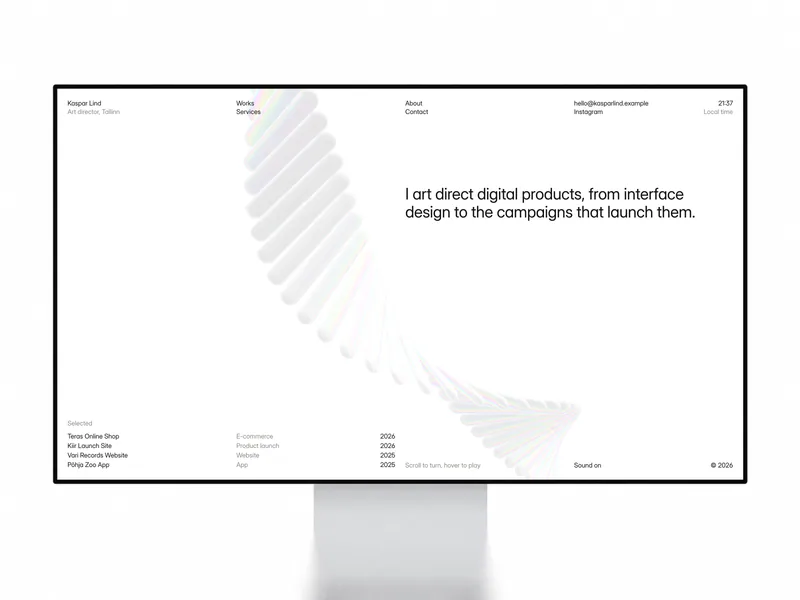

Kaspar
Portfolio · Free
A Swiss portfolio for product designers and art directors, with one Works collection.


Halvor
Photography · Free
A white, quiet portfolio for studio photographers, with one Works collection.


Maël Blanc
Portfolio · Free
A portfolio for independent designers, with a services table and two collections.
CMS and size limits
This is where WordPress clearly wins for large sites. On October 26, 2026, Framer Basic listed 30 pages, 2 CMS collections and 1,000 CMS items, and Pro listed 150 pages and 10 collections. WordPress.com lists unlimited pages, posts, users and visitors on its paid plans.
For a portfolio of 10 to 20 projects, Framer’s limits are enough. A site with a journal, a team, awards and offices is different. Maison Architect, for example, uses six CMS collections, so it needs more than Basic’s 2. My Framer pricing guide has a table of how many collections each free template uses.
SEO
Both can rank a portfolio. Framer generates a sitemap and a robots.txt file and lets you set a title and description per page. WordPress.com generates an XML sitemap at yoursite.com/sitemap.xml. Its marketing page says SEO is built into every site, but its support page for the extra SEO tools, which cover custom titles and descriptions, says they are available on the Premium, Business and Commerce plans. Check your plan before you count on them.
Framer’s comparison page says SEO on WordPress usually relies on plugins. WordPress.com’s own page says its SEO tools are built in, so that depends on which WordPress you use. For a portfolio, the text on the page and the links to it matter more than the platform. My Framer SEO guide covers the Framer settings.
Moving later
If you move to Framer, plan to rebuild the pages. Old URLs that matter will need redirects, and redirects are a Pro feature on Framer, at $30 per month on yearly billing.
Going the other way, WordPress.com’s import support page lists importers for Squarespace, Wix, Medium and self-hosted WordPress sites. I did not find Framer on it.
Who should pick which
Pick Framer if:
- Your portfolio is mostly images and case studies
- You want to design the pages, not fill in a theme
- You do not want to manage updates or plugins
Pick WordPress if:
- The site will grow into a large blog, a store or a membership
- You want a very large plugin catalog
- You already know WordPress and your site works
FAQ
Is Framer better than WordPress for a portfolio?
For a small, image-led portfolio, I think so, because it is simpler to run. WordPress is the better choice if the site will grow into a large blog, a store or a membership.
Is Framer cheaper than WordPress?
On October 26, 2026, Framer Basic was $10 per month on yearly billing and WordPress.com Personal was $4 per month billed every 12 months, both with hosting included. Self-hosted WordPress needs separate hosting.
What is the difference between WordPress.com and WordPress.org?
WordPress.com is fully hosted, with hosting, security, backups and updates managed for you. WordPress.org is open-source software you install on hosting you pay for and manage yourself.
Does WordPress need plugins for a portfolio?
Plugins are how WordPress adds features, and WordPress.com lists plugin installation on its paid plans, starting with Personal. I have not tested which portfolio theme covers galleries and forms without plugins.
Which is better for SEO?
Both can rank a portfolio. Each generates a sitemap and has a way to set titles and descriptions, though on WordPress.com that tool depends on your plan, so content and links matter more than the platform.
Can I sell prints with Framer or WordPress?
WordPress.com’s Commerce plan includes WooCommerce. Framer’s pricing page lists no built-in store, so a Framer site links out to a separate shop.